If inquiries from Google Ads are coming from places your business does not serve, first check whether the requested job is actually outside your service area and whether the inquiry came from an ad. A customer’s location, the job location, and Google’s estimated location are not always the same. Then review the campaign’s geographic settings, your website, and how your team records leads.
A few unsuitable calls do not prove that your entire budget is being wasted. The decision should be based on how many relevant jobs you can win, what those jobs are worth, and the cost of reaching them.
Why can local ads bring inquiries from outside your area?
Google can consider both where a person is and whether they have shown interest in a location. Depending on the campaign and settings, someone outside your service area may see an ad because they are interested in that area. Google’s explanation of advanced location options describes the difference between presence and interest.
Presence-based targeting can be a better fit when customers must be near your business. It is not a perfect border: Google uses location signals and says its targeting is a best effort. Someone outside your target area may still see an ad.
The person and the job may be in different places
A property owner in another state may need repairs at a rental property inside your service area. That could be a valuable inquiry. The reverse is possible too: someone nearby may be asking you to travel farther than your team can serve.
Ask where the work is needed before deciding that a lead is a geographic mismatch. Do not use the customer’s area code or the location in an ad report as the only proof.
Make sure the inquiry came from Google Ads
Your website can receive calls and forms from organic search, referrals, existing customers, and ads. If all inquiries arrive in the same inbox, an out-of-area lead may be assigned to the wrong source.
Ask your marketing partner how calls and forms are attributed, what is missing, and whether duplicate inquiries are counted. If the source is unclear, label it unknown rather than assuming an ad caused it. Our guide to Google Ads agency reporting explains the business questions a useful report should answer.
What should a business owner ask the agency to review?
Your actual service area. Agree on the towns, counties, or practical travel limits your team can serve profitably. A simple radius may not reflect bridges, travel time, minimum job value, or where you can schedule a technician.
Campaign coverage and settings. Ask which areas and location options each campaign uses, how your business handles people searching from elsewhere, and whether restrictions could block valuable customers. Exclusions can help in some cases, but no setting guarantees a perfect geographic boundary.
Ads and landing pages. Your website should make the service area clear before someone fills out a form or calls. A vague promise such as “serving the region” may not help visitors understand whether your team can take their job.
Lead records. Separate “outside service area” from “wrong service,” “not reached,” and “not ready.” These are different problems and may need different solutions. Review actual inquiries with the people who answer calls or schedule jobs.
How to tell whether the problem is expensive
Compare ad spending with inquiries your business could actually serve—not only with the total number of forms and calls. For example, if a campaign spends $1,000 and receives 20 inquiries, the average is $50 per inquiry. If only 10 are suitable and all 20 can reliably be attributed to the campaign, the cost per suitable inquiry is $100.
This example is illustrative, not an industry benchmark. Ten inquiries are too few for a confident conclusion, and suitability does not guarantee a booked job. Follow the numbers through to appointments, completed jobs, revenue, and relevant costs where possible.
What our experience shows
In a WEB ALTERNATIVE furniture retail case, campaigns were organized by product category and geographic targeting covered relevant cities and regions in Kazakhstan. It illustrates why matching the offer and location matters. The published case does not isolate the impact of geographic targeting, and its results should not be treated as a forecast for a U.S. service business.
Should you narrow your advertising area?
Not automatically. A narrower area can reduce unsuitable inquiries, but it can also exclude profitable jobs or customers who arrange work remotely. Review the value of the jobs you would lose as well as the spending you hope to save.
If an agency recommends a change, ask what it expects to improve, what useful traffic might be lost, and how you will measure the result. Avoid changing the geography, budget, offer, and website at the same time if you want to understand what made the difference.
For an existing campaign, our Google Ads management team can review how your advertising aligns with the locations and customers your business can serve.
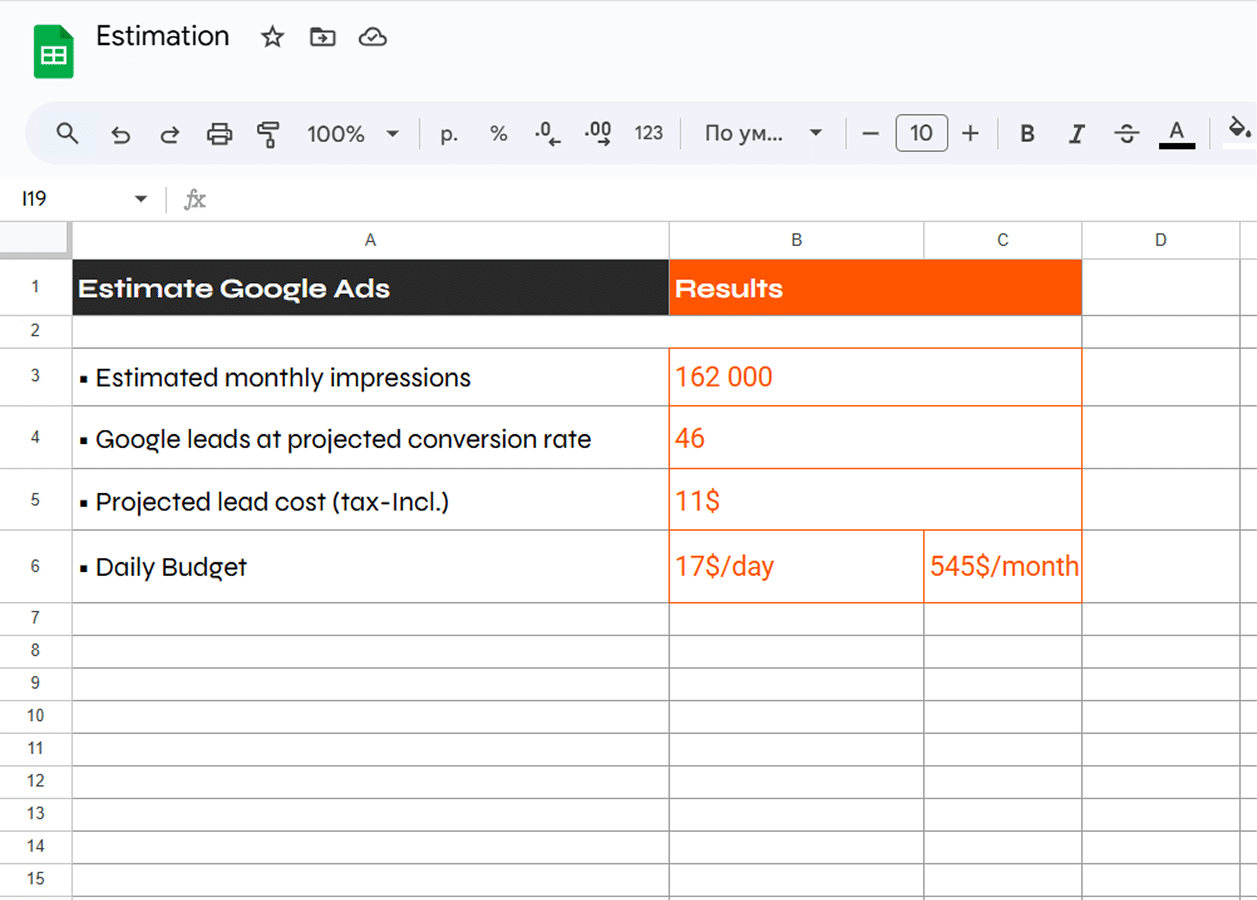
Estimate demand for the areas you serve
A free Google Ads forecast can help estimate demand, budget, potential inquiries, and cost per lead for your services, location, and goals. It is an estimate, not a guarantee. Use it alongside your travel costs, capacity, and the value of a booked job.
Frequently asked questions
Does an out-of-area call always mean Google ignored my settings?
No. The person may have expressed interest in your target area, the location signal may be imprecise, or the call may have come from another source. Confirm where the service is needed and how the inquiry arrived.
Should I exclude every neighboring town?
Only if doing so matches your business and campaign goals. A customer in a neighboring town might need work inside your area, and broad exclusions can remove useful traffic. Discuss the tradeoff with your advertising specialist.
Can a customer outside my area still be a good lead?
Yes. For example, an owner or property manager may be elsewhere while the property needing service is within your coverage. Qualify the job by where it will be performed.
Should I count missed calls as bad leads?
No. A missed call may be a suitable customer you did not reach. Track missed calls separately from inquiries you confirmed were outside your service area.
When should I judge whether a change worked?
Use a period that reflects your usual demand and booking cycle. Compare enough attributed inquiries and booked jobs, while considering seasonality and other changes. A handful of calls is not a reliable test.
Discuss your next step
If you are unsure whether your ads are reaching the right locations, WEB ALTERNATIVE can discuss your existing campaign and the next practical step. Request a free consultation.